
Your favorite games.
No ad breaks.

Sudoku, Solitaire, Minesweeper and more, together on iPhone and iPad. Play offline, keep your video going, and take a break without ads, coins or a subscription.

New in 1.6: Math Crossword and a little help when you need it.

Questions? Email support.

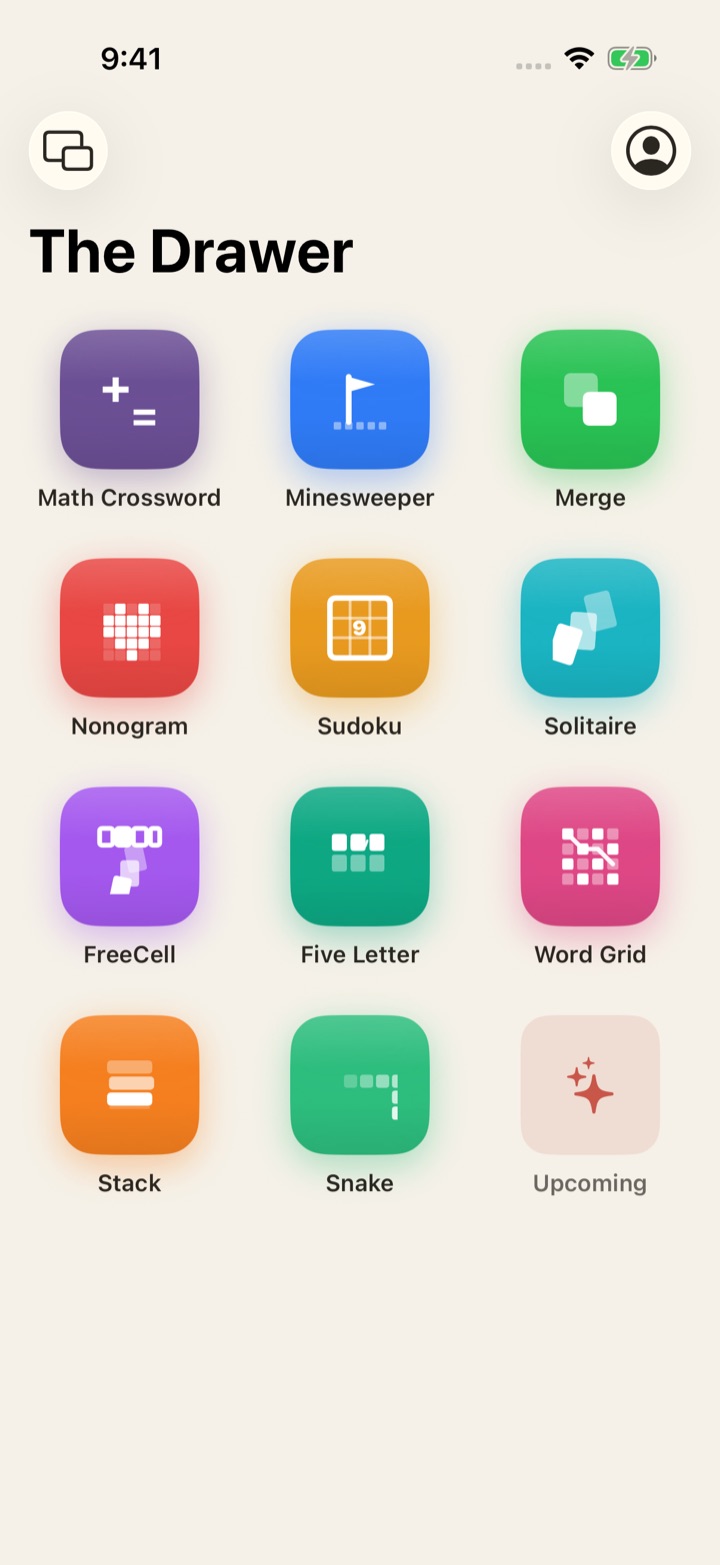
GameDrawer home screen showing eleven game tiles - Math Crossword, Minesweeper, Merge, Nonogram, Sudoku, Solitaire, FreeCell, Five Letter, Word Grid, Stack, and Snake - plus an Upcoming tile, on the Classic theme

New in 1.6: meet Math Crossword.

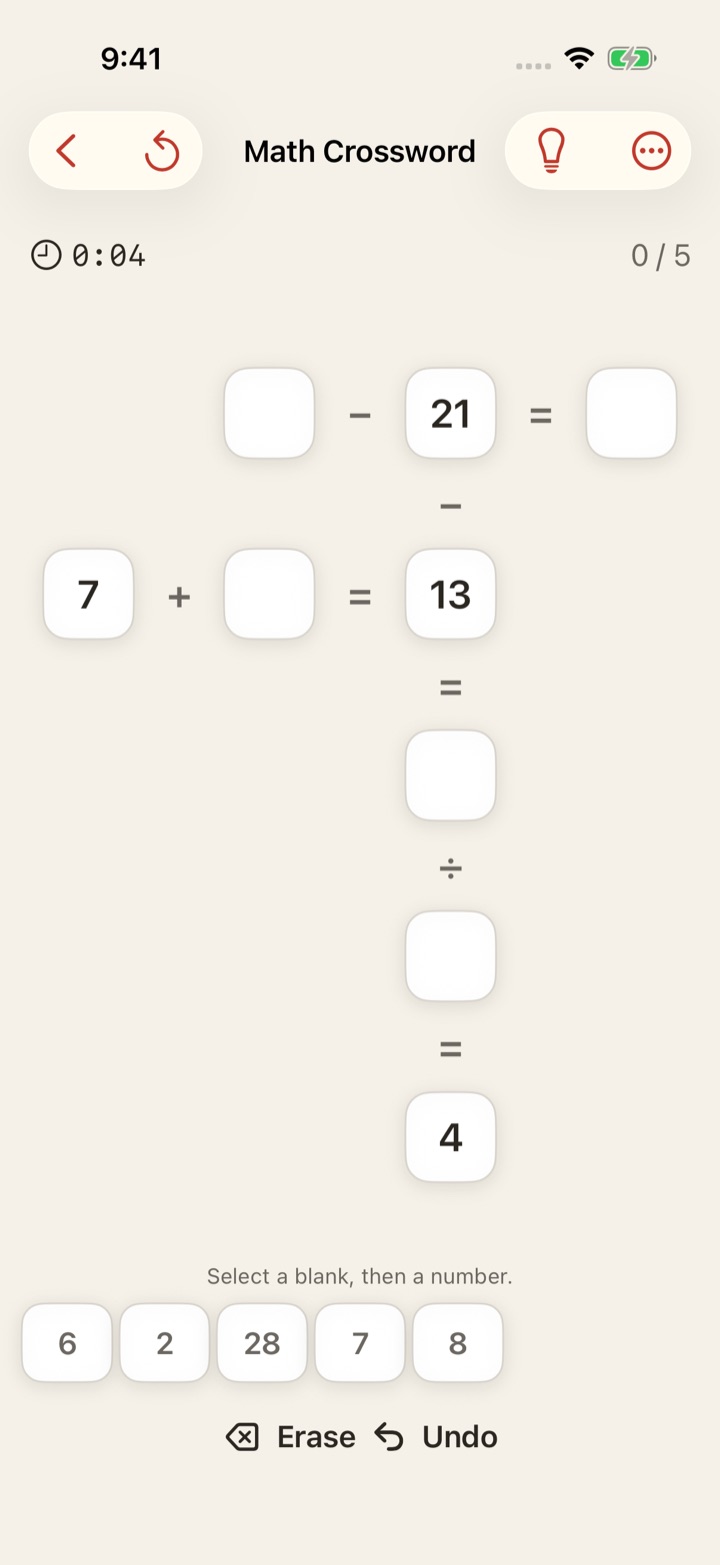
One new game brings the drawer to eleven. Fill the missing numbers so every crossing equation works. Choose from three difficulties, drag numbers into place, undo a move, and pick up your saved puzzle later.

Get a useful next step in supported puzzles. Keep solving Sudoku and Nonogram in Practice after your last life. Video Mode layouts make more room for the board and its controls.

See what is new in 1.6
Math Crossword in GameDrawer 1.6, with crossing equations and a number bank
Math Crossword, new in 1.6

App Features

01 / Video Mode

Play while your video runs.

Every game supports Picture-in-Picture. Choose one of six positions for your video window - large top, large bottom, or four corner slots - and each layout reflows to keep every control clear and tappable. Picture-in-Picture requires a video app that supports it.

02 / Eleven games

Find your next favorite.

Math Crossword with three difficulties and step-by-step hints, Minesweeper across three difficulties, Merge with 2048 and Infinite modes, Nonogram from 5×5 up to 20×20, Sudoku with 6,000 curated puzzles, FreeCell with deal-number entry and supermove rules, Klondike Solitaire with draw 1, 2, or 3, Five Letter with daily and unlimited word guessing, Word Grid for tracing words on a 4×4 board, Stack for dropping blocks on a 3D tower, and Snake in wrap or walls mode. Each one tuned, none of them loud.

03 / Local-first

Your stats stay yours.

Best times, wins and game records stay on your device. Export a backup or turn on optional iCloud sync to carry your stats to another device. Deleting the app removes local-only records.

04 / No ads

No coins. No energy timers.

No banner ads, no forced video ads, no fake currency, no subscription pestering, no required account. Open the app, play.

05 / Themes

35 themes for your kind of break.

Six DesignKit families (Classic, Sweet, Bright, Soft, Moody, Loud) plus a custom palette editor. Every game adapts to the look you pick.

06 / Stats that stick

Best times, win %, games played.

Per-difficulty bests, lifetime totals, and a full record table. Export it all as JSON, re-import on a new device, or never look at it again.

07 / Optional iCloud

Sync only if you ask.

Sign in with Apple enables CloudKit sync across your devices. Off by default. Sign out and your records stay on the device.

Minesweeper mid-game with a large video window above the board, showing Picture-in-Picture Video Mode

01 / Video Mode

Play while your video runs.

Pick one of six positions for your video window - large top, large bottom, or four corner slots. Each game reflows its layout to keep every control clear and tappable. Picture-in-Picture requires a video app that supports it.

05 / Themes

Same game, different feel.

Six theme families - Classic, Sweet, Bright, Soft, Moody, Loud - plus a custom palette editor. Every game adapts to the look you pick.

FreeCell on the Classic green felt theme
Classic
FreeCell on a dark Moody theme
Moody
FreeCell on the Sweet pink theme
Sweet